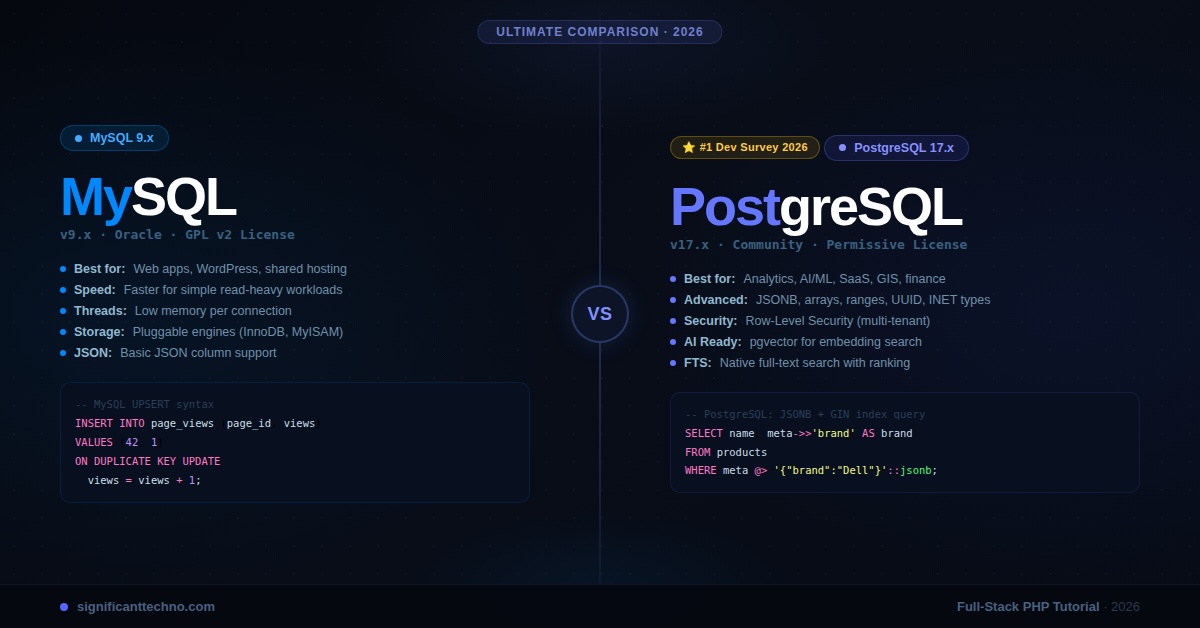
MySQL and PostgreSQL are the two most popular open-source relational databases in the world — but they are built with very different philosophies. In this in-depth comparison, we break down their differences in performance, data types, JSON support, full-text search, replication, licensing, and real-world use cases so you can make the right choice for your 2026 project.
MySQL vs PostgreSQL in 2026: Which Database Should You Choose?
Choosing between MySQL and PostgreSQL is one of the most common and important decisions a developer or architect makes when starting a new project. Both are mature, battle-tested, open-source relational databases — but they have different strengths, philosophies, and ideal use cases.
MySQL prioritizes speed, simplicity, and wide compatibility. PostgreSQL prioritizes standards compliance, extensibility, and advanced features. In 2026, both have evolved significantly, making this comparison more nuanced than ever.
This guide gives you a thorough, side-by-side comparison with real SQL examples so you can make an informed, confident decision.
Table of Contents
- Quick Overview
- Architecture & Philosophy
- Data Types Comparison
- JSON & Document Support
- Performance & Benchmarks
- SQL Syntax Differences
- Full-Text Search
- Replication & High Availability
- Transactions & ACID Compliance
- Extensions & Ecosystem
- Security Features
- Real-World Use Cases
- Connecting from PHP
- Final Verdict: Which Should You Choose?
1. Quick Overview
Before diving deep, here is a high-level snapshot of both databases as they stand in 2026:
MySQL 2026
- Latest stable version: MySQL 9.x
- Owned by: Oracle Corporation
- License: GPL v2 (Community) / Commercial
- Primary strengths: Speed for read-heavy workloads, ease of use, massive ecosystem, wide hosting support
- Best known for: LAMP stack, WordPress, e-commerce, web applications
- Storage engines: InnoDB (default), MyISAM, NDB Cluster, Memory
PostgreSQL 2026
- Latest stable version: PostgreSQL 17.x
- Owned by: PostgreSQL Global Development Group (community-driven)
- License: PostgreSQL License (permissive, MIT-style)
- Primary strengths: Advanced features, full SQL standards compliance, extensibility, complex queries
- Best known for: Analytics, GIS (PostGIS), financial systems, complex data models
- Storage engine: Single unified engine (heap-based)
2. Architecture & Philosophy
The core difference between MySQL and PostgreSQL starts at the architectural level.
MySQL Architecture
MySQL uses a pluggable storage engine architecture. The query layer is separate from the storage layer, meaning you can swap storage engines (InnoDB, MyISAM, etc.) depending on your workload. InnoDB has been the default since MySQL 5.5 and supports transactions, foreign keys, and row-level locking.
PostgreSQL Architecture
PostgreSQL uses a single, unified process-based architecture — each client connection spawns a new backend process. It follows the object-relational model, meaning tables are actually objects, and you can inherit from them, define custom types, write functions in multiple languages (PL/pgSQL, PL/Python, PL/Perl, JavaScript), and extend it in ways MySQL simply does not support.
Key Architectural Differences
- Concurrency model: PostgreSQL uses MVCC (Multi-Version Concurrency Control) with true snapshot isolation. MySQL InnoDB also uses MVCC but with a different implementation that can have more lock contention in write-heavy scenarios.
- Process vs Thread: PostgreSQL spawns a new OS process per connection (more memory per connection). MySQL uses threads, making it lighter at high connection counts.
- WAL (Write-Ahead Logging): Both use WAL for crash recovery, but PostgreSQL's WAL is the backbone of its streaming replication and is more transparent and configurable.
3. Data Types Comparison
PostgreSQL supports a significantly richer set of native data types out of the box.
MySQL Data Types (Key ones)
CREATE TABLE mysql_example (
    id            INT AUTO_INCREMENT PRIMARY KEY,
    name          VARCHAR(255)      NOT NULL,
    price         DECIMAL(10, 2),
    is_active     TINYINT(1)        DEFAULT 1,   -- used as BOOLEAN
    description   TEXT,
    created_at    DATETIME          DEFAULT CURRENT_TIMESTAMP,
    meta          JSON,                          -- added in MySQL 5.7
    tags          SET('php','js','python'),       -- MySQL-specific
    uuid_col      CHAR(36)                        -- UUID stored as string
);
PostgreSQL Data Types (Key ones)
CREATE TABLE pg_example (
    id            SERIAL PRIMARY KEY,            -- or BIGSERIAL, or GENERATED ALWAYS AS IDENTITY
    name          VARCHAR(255)      NOT NULL,
    price         NUMERIC(10, 2),
    is_active     BOOLEAN           DEFAULT TRUE, -- native BOOLEAN
    description   TEXT,
    created_at    TIMESTAMPTZ       DEFAULT NOW(),-- timezone-aware timestamp
    meta          JSONB,                          -- binary JSON (indexed, faster)
    tags          TEXT[],                         -- native array type
    uuid_col      UUID              DEFAULT gen_random_uuid(), -- native UUID
    ip_address    INET,                           -- native IP address type
    coordinates   POINT,                          -- native geometric type
    price_range   INT4RANGE,                      -- native range type
    doc_vector    TSVECTOR                        -- full-text search vector
);
PostgreSQL's native support for UUID, BOOLEAN, ARRAY, INET, RANGE types, and geometric types gives it a significant advantage for complex data modelling. MySQL handles most of these through workarounds (e.g., storing IPs as integers, UUIDs as CHAR(36)).
4. JSON & Document Support
In 2026, both databases have strong JSON capabilities — but PostgreSQL's JSONB is widely regarded as the more powerful implementation.
MySQL JSON
-- MySQL: Store and query JSON
CREATE TABLE products (
    id    INT AUTO_INCREMENT PRIMARY KEY,
    name  VARCHAR(200),
    meta  JSON
);

INSERT INTO products (name, meta) VALUES
('Laptop', '{"brand": "Dell", "specs": {"ram": 16, "storage": 512}, "tags": ["sale","tech"]}');

-- Query a JSON field
SELECT
    name,
    meta->>'$.brand'                AS brand,
    meta->>'$.specs.ram'            AS ram_gb,
    JSON_EXTRACT(meta, '$.tags[0]') AS first_tag
FROM products
WHERE JSON_EXTRACT(meta, '$.specs.ram') > 8;
PostgreSQL JSONB
-- PostgreSQL: Store and query JSONB (binary, indexed)
CREATE TABLE products (
    id    SERIAL PRIMARY KEY,
    name  VARCHAR(200),
    meta  JSONB
);

INSERT INTO products (name, meta) VALUES
('Laptop', '{"brand": "Dell", "specs": {"ram": 16, "storage": 512}, "tags": ["sale","tech"]}');

-- Query JSONB — cleaner operator syntax
SELECT
    name,
    meta->>'brand'              AS brand,
    meta->'specs'->>'ram'       AS ram_gb,
    meta->'tags'->>0            AS first_tag
FROM products
WHERE (meta->'specs'->>'ram')::INT > 8;

-- Create a GIN index on the entire JSONB column (game changer!)
CREATE INDEX idx_products_meta ON products USING GIN (meta);

-- Now this query uses the index:
SELECT * FROM products WHERE meta @> '{"brand": "Dell"}';
The key advantage of PostgreSQL's JSONB is that it stores data in a decomposed binary format and supports GIN indexing on the entire JSON document. This means you can query any field inside a JSONB column with index support — something MySQL's JSON does not offer at the same level.
5. Performance & Benchmarks
Performance comparisons between MySQL and PostgreSQL depend heavily on your workload type. Here is a general breakdown based on industry benchmarks and real-world experience in 2026:
Read-Heavy Workloads (SELECT)
MySQL (with InnoDB) is traditionally faster for simple, high-volume read operations — especially with connection pooling (ProxySQL, PgBouncer). Its threading model handles thousands of concurrent simple reads very efficiently. This is why MySQL remains dominant in CMS platforms, e-commerce, and content-heavy websites.
Write-Heavy Workloads (INSERT / UPDATE / DELETE)
PostgreSQL tends to perform better in write-heavy scenarios because of its superior MVCC implementation, which reduces lock contention significantly. For applications with heavy concurrent writes — like SaaS platforms, analytics pipelines, or financial ledgers — PostgreSQL is usually the better choice.
Complex Queries (JOINs, Aggregations, CTEs)
PostgreSQL's query planner is significantly more sophisticated than MySQL's. It handles complex multi-table JOINs, window functions, CTEs, and subqueries much more efficiently. For analytics and reporting workloads, PostgreSQL is the clear winner.
Performance Tuning — Key Config Parameters
MySQL config file: /etc/mysql/mysql.conf.d/mysqld.cnf
[mysqld]
# InnoDB buffer pool — set to 70-80% of total RAM
innodb_buffer_pool_size     = 4G

# Parallel query threads
innodb_read_io_threads      = 8
innodb_write_io_threads     = 8

# Query cache (removed in MySQL 8, use ProxySQL instead)
# Enable binary log for replication
log_bin                     = /var/log/mysql/mysql-bin.log

# Connection handling
max_connections             = 500
thread_cache_size           = 50

# Slow query log
slow_query_log              = 1
long_query_time             = 1
PostgreSQL config file: /etc/postgresql/17/main/postgresql.conf
# Memory
shared_buffers              = 4GB          # 25% of RAM
effective_cache_size        = 12GB         # 75% of RAM
work_mem                    = 64MB         # per sort/hash operation
maintenance_work_mem        = 1GB          # for VACUUM, CREATE INDEX

# Parallelism
max_parallel_workers        = 8
max_parallel_workers_per_gather = 4

# WAL & Checkpoints
wal_buffers                 = 64MB
checkpoint_completion_target = 0.9
max_wal_size                = 4GB

# Connections (use PgBouncer for pooling)
max_connections             = 200

# Query planner
random_page_cost            = 1.1          # for SSD storage
effective_io_concurrency    = 200
6. SQL Syntax Differences
While both follow standard SQL, there are notable syntax differences you'll encounter when switching between them.
Auto Increment / Sequences
-- MySQL
CREATE TABLE orders (
    id INT AUTO_INCREMENT PRIMARY KEY
);

-- PostgreSQL (legacy SERIAL)
CREATE TABLE orders (
    id SERIAL PRIMARY KEY
);

-- PostgreSQL (modern — SQL standard, preferred in 2026)
CREATE TABLE orders (
    id INT GENERATED ALWAYS AS IDENTITY PRIMARY KEY
);
String Concatenation
-- MySQL uses CONCAT() function
SELECT CONCAT(first_name, ' ', last_name) AS full_name FROM users;

-- PostgreSQL supports both CONCAT() and the || operator
SELECT first_name || ' ' || last_name AS full_name FROM users;
SELECT CONCAT(first_name, ' ', last_name) AS full_name FROM users;
LIMIT and OFFSET
-- MySQL
SELECT * FROM products ORDER BY id LIMIT 10 OFFSET 20;

-- PostgreSQL (same syntax, also supports FETCH)
SELECT * FROM products ORDER BY id LIMIT 10 OFFSET 20;

-- PostgreSQL SQL-standard alternative (better for cursors)
SELECT * FROM products ORDER BY id
FETCH FIRST 10 ROWS ONLY OFFSET 20 ROWS;
UPSERT (INSERT or UPDATE)
-- MySQL: INSERT ... ON DUPLICATE KEY UPDATE
INSERT INTO page_views (page_id, view_count)
VALUES (42, 1)
ON DUPLICATE KEY UPDATE view_count = view_count + 1;

-- PostgreSQL: INSERT ... ON CONFLICT DO UPDATE (cleaner and more flexible)
INSERT INTO page_views (page_id, view_count)
VALUES (42, 1)
ON CONFLICT (page_id)
DO UPDATE SET
    view_count = page_views.view_count + 1,
    last_viewed = NOW();
Window Functions (Both support, PostgreSQL more advanced)
-- Works in both MySQL 8+ and PostgreSQL
SELECT
    name,
    department,
    salary,
    RANK()       OVER (PARTITION BY department ORDER BY salary DESC) AS dept_rank,
    DENSE_RANK() OVER (PARTITION BY department ORDER BY salary DESC) AS dense_rank,
    LAG(salary)  OVER (PARTITION BY department ORDER BY salary DESC) AS prev_salary,
    AVG(salary)  OVER (PARTITION BY department)                      AS dept_avg
FROM employees;

-- PostgreSQL-only: FILTER clause in window functions
SELECT
    department,
    SUM(salary)                                    AS total_salary,
    SUM(salary) FILTER (WHERE status = 'active')   AS active_salary
FROM employees
GROUP BY department;
7. Full-Text Search
Both databases offer full-text search, but PostgreSQL's implementation is more powerful and flexible without needing external tools.
MySQL Full-Text Search
-- MySQL: Requires FULLTEXT index on MyISAM or InnoDB
CREATE TABLE articles (
    id      INT AUTO_INCREMENT PRIMARY KEY,
    title   VARCHAR(300),
    content TEXT,
    FULLTEXT idx_fts (title, content)
) ENGINE=InnoDB;

-- Natural language search
SELECT id, title,
    MATCH(title, content) AGAINST ('Laravel deployment tutorial' IN NATURAL LANGUAGE MODE) AS score
FROM articles
WHERE MATCH(title, content) AGAINST ('Laravel deployment tutorial' IN NATURAL LANGUAGE MODE)
ORDER BY score DESC;
PostgreSQL Full-Text Search
-- PostgreSQL: Native tsvector/tsquery with language support
CREATE TABLE articles (
    id       SERIAL PRIMARY KEY,
    title    VARCHAR(300),
    content  TEXT,
    fts_vec  TSVECTOR  -- precomputed vector column
);

-- Auto-generate search vector
UPDATE articles
SET fts_vec = to_tsvector('english', title || ' ' || content);

-- Create GIN index for fast search
CREATE INDEX idx_articles_fts ON articles USING GIN (fts_vec);

-- Search with ranking
SELECT
    id,
    title,
    ts_rank(fts_vec, query) AS rank
FROM
    articles,
    to_tsquery('english', 'Laravel & deployment & tutorial') query
WHERE fts_vec @@ query
ORDER BY rank DESC;

-- Highlight matching terms in results
SELECT
    title,
    ts_headline('english', content,
        to_tsquery('english', 'Laravel & deployment'),
        'MaxWords=30, MinWords=15, StartSel=<mark>, StopSel=</mark>'
    ) AS excerpt
FROM articles
WHERE fts_vec @@ to_tsquery('english', 'Laravel & deployment');
PostgreSQL's full-text search supports multiple languages, stemming, ranking, and result highlighting natively. MySQL's full-text search is simpler and less configurable. For serious search needs, both databases often defer to Elasticsearch or Typesense — but PostgreSQL can handle a much wider range of search requirements without external dependencies.
8. Replication & High Availability
MySQL Replication
MySQL offers several replication modes:
- Async Replication: Primary writes to binary log; replicas pull changes asynchronously. Very fast but a replica may lag behind.
- Semi-sync Replication: Primary waits for at least one replica to acknowledge receipt before committing. Better durability.
- Group Replication / InnoDB Cluster: MySQL's built-in multi-primary, fault-tolerant clustering solution (introduced in MySQL 5.7, matured in 8.x).
- MySQL Router + InnoDB ClusterSet: Enterprise-grade HA with automatic failover in 2026.
PostgreSQL Replication
PostgreSQL's replication is built on WAL streaming and is highly flexible:
- Streaming Replication: Physical byte-for-byte replication of WAL records to standbys. Very reliable and low-latency.
- Logical Replication: Replicate specific tables or operations, allowing cross-version replication and selective sync. Introduced in PostgreSQL 10, greatly improved by PostgreSQL 16/17.
- Patroni + etcd / Consul: Industry-standard HA solution for PostgreSQL with automatic leader election and failover.
- Citus: Turns PostgreSQL into a distributed database for horizontal sharding.
- pgEdge: Distributed active-active PostgreSQL solution emerging in 2025-2026.
9. Transactions & ACID Compliance
Both databases are ACID compliant with InnoDB (MySQL) and the default engine (PostgreSQL), but there are important differences in how they handle transactions.
Savepoints & Nested Transactions
-- Both MySQL and PostgreSQL support SAVEPOINT
BEGIN;

INSERT INTO orders (customer_id, total) VALUES (1, 500.00);

SAVEPOINT after_order;

INSERT INTO order_items (order_id, product_id, qty) VALUES (LAST_INSERT_ID(), 10, 2);

-- Something went wrong with items, rollback to savepoint only
ROLLBACK TO SAVEPOINT after_order;

-- Order record is still intact, commit it
COMMIT;
Isolation Levels
-- MySQL: Set isolation level for session
SET SESSION TRANSACTION ISOLATION LEVEL REPEATABLE READ;  -- MySQL default
SET SESSION TRANSACTION ISOLATION LEVEL SERIALIZABLE;
SET SESSION TRANSACTION ISOLATION LEVEL READ COMMITTED;

-- PostgreSQL: Set isolation level per transaction
BEGIN TRANSACTION ISOLATION LEVEL SERIALIZABLE;
-- ... your queries ...
COMMIT;

-- PostgreSQL supports a true SERIALIZABLE isolation level using
-- Serializable Snapshot Isolation (SSI) — much safer than MySQL's
-- which uses locking. SSI detects conflicts without taking locks.
PostgreSQL's Serializable Snapshot Isolation (SSI) is a standout feature. It provides true serializable transactions without the heavy locking that MySQL's SERIALIZABLE mode uses — giving you full safety with much better concurrency.
10. Extensions & Ecosystem
PostgreSQL Extensions (Major ones in 2026)
-- List installed extensions
SELECT name, default_version, installed_version, comment
FROM pg_available_extensions
WHERE installed_version IS NOT NULL;

-- PostGIS — Geographic/spatial data (industry standard for GIS)
CREATE EXTENSION IF NOT EXISTS postgis;

-- pg_vector — Store and query AI embeddings (huge in 2025/2026!)
CREATE EXTENSION IF NOT EXISTS vector;

CREATE TABLE documents (
    id        SERIAL PRIMARY KEY,
    content   TEXT,
    embedding VECTOR(1536)  -- OpenAI ada-002 embedding dimensions
);

-- Create an HNSW index for fast approximate nearest-neighbor search
CREATE INDEX ON documents USING hnsw (embedding vector_cosine_ops);

-- Find the 5 most semantically similar documents to a given embedding
SELECT content, embedding <=> '[0.1, 0.2, ...]'::vector AS distance
FROM documents
ORDER BY distance
LIMIT 5;

-- pg_cron — Schedule jobs inside PostgreSQL
CREATE EXTENSION IF NOT EXISTS pg_cron;
SELECT cron.schedule('nightly-vacuum', '0 3 * * *', 'VACUUM ANALYZE');

-- TimescaleDB — Time-series data (runs on top of PostgreSQL)
CREATE EXTENSION IF NOT EXISTS timescaledb;
SELECT create_hypertable('sensor_readings', 'recorded_at');
MySQL Plugins & Ecosystem
MySQL has a solid ecosystem but relies more on external tools:
- ProxySQL: Advanced connection pooling and query routing
- Percona Server for MySQL: Drop-in replacement with extra performance features
- MySQL Shell: Modern CLI with JavaScript/Python scripting
- Group Replication / InnoDB Cluster: Built-in HA
- MySQL HeatWave: Oracle's in-memory analytics accelerator (cloud-only)
The pgvector extension deserves special mention — it has made PostgreSQL the go-to database for AI/ML applications in 2025-2026, enabling semantic search, RAG pipelines, and vector similarity search directly inside the database.
11. Security Features
MySQL Security
-- Create a restricted user in MySQL
CREATE USER 'app_user'@'localhost'
    IDENTIFIED BY 'StrongP@ssw0rd!'
    PASSWORD EXPIRE INTERVAL 90 DAY
    FAILED_LOGIN_ATTEMPTS 5
    PASSWORD_LOCK_TIME 2;

-- Grant only what's needed
GRANT SELECT, INSERT, UPDATE ON myapp.* TO 'app_user'@'localhost';

-- MySQL 8+ roles
CREATE ROLE 'read_only', 'read_write';
GRANT SELECT ON myapp.* TO 'read_only';
GRANT SELECT, INSERT, UPDATE, DELETE ON myapp.* TO 'read_write';
GRANT 'read_write' TO 'app_user'@'localhost';

-- Enable SSL requirement
ALTER USER 'app_user'@'localhost' REQUIRE SSL;
PostgreSQL Security
-- Create a restricted user in PostgreSQL
CREATE USER app_user
    WITH PASSWORD 'StrongP@ssw0rd!'
    CONNECTION LIMIT 50
    VALID UNTIL '2027-01-01';

-- Grant schema-level permissions
GRANT CONNECT ON DATABASE myapp TO app_user;
GRANT USAGE ON SCHEMA public TO app_user;
GRANT SELECT, INSERT, UPDATE ON ALL TABLES IN SCHEMA public TO app_user;
GRANT USAGE, SELECT ON ALL SEQUENCES IN SCHEMA public TO app_user;

-- Row-Level Security (PostgreSQL-exclusive, very powerful)
ALTER TABLE orders ENABLE ROW LEVEL SECURITY;

-- Policy: users can only see their own orders
CREATE POLICY orders_isolation_policy ON orders
    USING (customer_id = current_setting('app.current_user_id')::INT);

-- Now each query automatically filters rows per user:
-- SELECT * FROM orders; -- only returns rows where customer_id = current user
PostgreSQL's Row-Level Security (RLS) is a feature MySQL does not have. It allows you to define security policies at the row level so that users automatically only see the rows they're permitted to — no extra WHERE clauses needed in your application code. This is extremely powerful for multi-tenant SaaS applications.
12. Real-World Use Cases
Choose MySQL When:
- You are building a WordPress, Drupal, or Joomla site — these CMSes are tightly coupled to MySQL
- You need shared hosting — virtually every cPanel host offers MySQL, far fewer support PostgreSQL
- You are building a simple CRUD web application with Laravel, CodeIgniter, or plain PHP and need fast reads
- Your team is small and MySQL expertise is readily available
- You need easy horizontal read scaling with replicas for a high-traffic content site
- You are using Laravel with Eloquent — MySQL's dialect is its first-class citizen
- You need Oracle support and enterprise tools — MySQL Enterprise Edition has extensive tooling
Choose PostgreSQL When:
- You need complex data types — arrays, ranges, UUIDs, INET, geometric types
- You are building an AI or ML application using pgvector for embeddings and semantic search
- You need GIS and geographic data — PostGIS is the industry standard
- You are handling financial data — PostgreSQL's stricter type system and true serializable isolation reduce bugs
- You need Row-Level Security for a multi-tenant SaaS platform
- You are doing heavy analytics — PostgreSQL's query planner handles complex aggregations much better
- You need true SQL standards compliance — PostgreSQL passes far more of the SQL standard than MySQL
- You are using Django, FastAPI, or SQLAlchemy — PostgreSQL is the de facto choice in the Python ecosystem
- You want a permissive license — PostgreSQL's license has no GPL restrictions, making it safer to embed in commercial products
13. Connecting from PHP
Both databases work seamlessly with PHP through PDO. Here are ready-to-use connection patterns for both.
MySQL Connection with PDO
File: config/database-mysql.php
<?php

// MySQL PDO Connection
function getMysqlConnection(): PDO
{
    $config = [
        'host'    => 'localhost',
        'port'    => '3306',
        'dbname'  => 'myapp_db',
        'charset' => 'utf8mb4',
    ];

    $dsn = sprintf(
        'mysql:host=%s;port=%s;dbname=%s;charset=%s',
        $config['host'],
        $config['port'],
        $config['dbname'],
        $config['charset']
    );

    return new PDO($dsn, 'db_user', 'db_password', [
        PDO::ATTR_ERRMODE            => PDO::ERRMODE_EXCEPTION,
        PDO::ATTR_DEFAULT_FETCH_MODE => PDO::FETCH_ASSOC,
        PDO::ATTR_EMULATE_PREPARES   => false,       // use real prepared statements
        PDO::MYSQL_ATTR_FOUND_ROWS   => true,         // rowCount() returns matched rows
        PDO::ATTR_PERSISTENT         => false,
    ]);
}

// Usage example
$pdo  = getMysqlConnection();
$stmt = $pdo->prepare('SELECT id, name, email FROM users WHERE status = ? LIMIT ?');
$stmt->execute(['active', 10]);
$users = $stmt->fetchAll();

foreach ($users as $user) {
    echo $user['id'] . ' — ' . $user['name'] . PHP_EOL;
}
PostgreSQL Connection with PDO
File: config/database-pgsql.php
<?php

// PostgreSQL PDO Connection
function getPostgresConnection(): PDO
{
    $config = [
        'host'    => 'localhost',
        'port'    => '5432',
        'dbname'  => 'myapp_db',
    ];

    $dsn = sprintf(
        'pgsql:host=%s;port=%s;dbname=%s',
        $config['host'],
        $config['port'],
        $config['dbname']
    );

    $pdo = new PDO($dsn, 'db_user', 'db_password', [
        PDO::ATTR_ERRMODE            => PDO::ERRMODE_EXCEPTION,
        PDO::ATTR_DEFAULT_FETCH_MODE => PDO::FETCH_ASSOC,
        PDO::ATTR_EMULATE_PREPARES   => false,
    ]);

    // Set application name for pg_stat_activity monitoring
    $pdo->exec("SET application_name = 'my_php_app'");

    return $pdo;
}

// Usage with JSONB query
$pdo  = getPostgresConnection();
$stmt = $pdo->prepare(
    "SELECT id, name, meta->>'brand' AS brand
     FROM   products
     WHERE  meta @> :filter::jsonb
     LIMIT  10"
);
$stmt->execute([':filter' => json_encode(['brand' => 'Dell'])]);
$products = $stmt->fetchAll();

foreach ($products as $product) {
    echo $product['id'] . ' — ' . $product['name'] . ' (' . $product['brand'] . ')' . PHP_EOL;
}
Laravel: Switch Between MySQL and PostgreSQL
File: .env
# For MySQL
DB_CONNECTION=mysql
DB_HOST=127.0.0.1
DB_PORT=3306
DB_DATABASE=myapp_db
DB_USERNAME=db_user
DB_PASSWORD=db_password

# For PostgreSQL (just change these lines)
DB_CONNECTION=pgsql
DB_HOST=127.0.0.1
DB_PORT=5432
DB_DATABASE=myapp_db
DB_USERNAME=db_user
DB_PASSWORD=db_password
Laravel's Eloquent ORM and query builder support both MySQL and PostgreSQL with minimal code changes. Most queries are identical — differences appear mainly in raw SQL, JSON queries, and specific data type handling.
14. Final Verdict: Which Should You Choose?
Side-by-Side Summary
Go with MySQL if you need:
- Simple web apps, blogs, CMS (WordPress, etc.)
- Shared hosting compatibility
- Massive community of PHP/MySQL tutorials and developers
- Slightly lower memory footprint at high connection counts
- Oracle enterprise support and tooling
Go with PostgreSQL if you need:
- Complex data types (arrays, JSONB, ranges, UUID, INET)
- AI/ML vector search via pgvector
- Geographic data via PostGIS
- Row-Level Security for multi-tenant apps
- Advanced analytics and complex query performance
- True SQL standard compliance
- Permissive open-source license
The Honest Answer
In 2026, PostgreSQL has overtaken MySQL as the most popular database among professional developers according to the Stack Overflow Developer Survey — for the third consecutive year. Its richer feature set, stronger standards compliance, and the explosive growth of pgvector for AI applications have made it the default choice for new projects in the Django, FastAPI, Rails, and modern Node.js ecosystems.
However, MySQL is far from dead. It remains the backbone of billions of WordPress sites, countless e-commerce platforms, and PHP applications worldwide. Its simplicity, speed for basic operations, and universal hosting support make it a perfectly valid choice for the right use case.
The rule of thumb for 2026: If you are starting a new project and don't have a specific reason to use MySQL, start with PostgreSQL. If you are maintaining or extending an existing MySQL application, there is usually no compelling reason to migrate — MySQL continues to receive excellent updates and improvements.
Conclusion
MySQL and PostgreSQL are both excellent, production-proven databases. The "which is better" question has no universal answer — the right choice depends entirely on your specific requirements, team expertise, and hosting constraints.
Here is a quick recap of the key differences covered in this guide:
- Architecture: MySQL uses pluggable storage engines; PostgreSQL uses a unified process-based ORDBMS
- Data Types: PostgreSQL wins with native arrays, UUID, INET, ranges, and geometric types
- JSON: PostgreSQL's JSONB with GIN indexing is more powerful than MySQL's JSON
- Performance: MySQL wins for simple reads; PostgreSQL wins for complex queries and writes
- Full-Text Search: PostgreSQL's native FTS is more flexible and powerful
- Extensions: PostgreSQL's pgvector, PostGIS, TimescaleDB have no MySQL equivalents
- Security: PostgreSQL's Row-Level Security is a unique, powerful feature
- Ecosystem: MySQL dominates shared hosting and CMS; PostgreSQL dominates modern app development
Whichever database you choose, make sure it fits your team's skills, your hosting environment, and the specific data patterns your application demands. Both will serve you well — and both will continue to improve significantly through 2026 and beyond.
Have questions about migrating from MySQL to PostgreSQL, or need help choosing for a specific project? Drop a comment below — we are happy to help!